Make a UGC ad
A creator talks about your product, cut with product shots, in a few hooks to test.
A UGC ad is a creator talking to camera about your product, cut with shots of the product, captioned, with music under it. You write the script, or have Shotz write any part of it; then Shotz makes every part and cuts one timeline for each opening line (the hook), so you can test which one works. Nothing is made until the last step. Open Tools → UGC ad.
You can also ask the Agent to set one up. It opens this tool on the first step with your product, the brief, and the creator, length and number of hooks already filled in. Check them and go on; nothing is written or spent until you do.
1. Product
Drop a photo of the product on the box at the top (or anywhere on the page), choose choose one in it to pick a file, or paste one with ⌘V; on a phone, tap Add a photo to take one or pick one from your phone. Or pick one you already have: Your products are your product elements, with the one you used last already picked, and Library is everything else, with a search once there are more than a dozen. A photo you upload goes into your Library and is picked; it stays in a row of tiles under the box, newest first, so you can pick another of them later. Tick Save it to Your products to use again to make it a product element when you go on, so it’s there next time; leave it unticked to use the photo just this once. To make a product from several photos, choose New product.
2. Brief
What’s the ad about? asks for one thing: say what you’re selling, who it’s for, and anything they have to say (a price, an offer, a phone number). Under it, How many ads? picks 1, 3 or 5. Each ad opens a different way (its hook) and shares the rest of the script, so you can test which opening works. Under Options are how long each ad runs (15, 30 or 45 seconds), Brand and Write it like an ad you saved (below).
Write the script · free writes the hooks and the lines from your brief. Already have one? Have a script already? has From a doc and Upload a script (a PDF, Word, Final Draft, Fountain or text file, read in your browser). Shotz splits it into hooks and body in your own words, keeping them wherever they fit the length, and writes whatever is missing around them. It needs the product picked first, and only the first 8,000 characters are used.
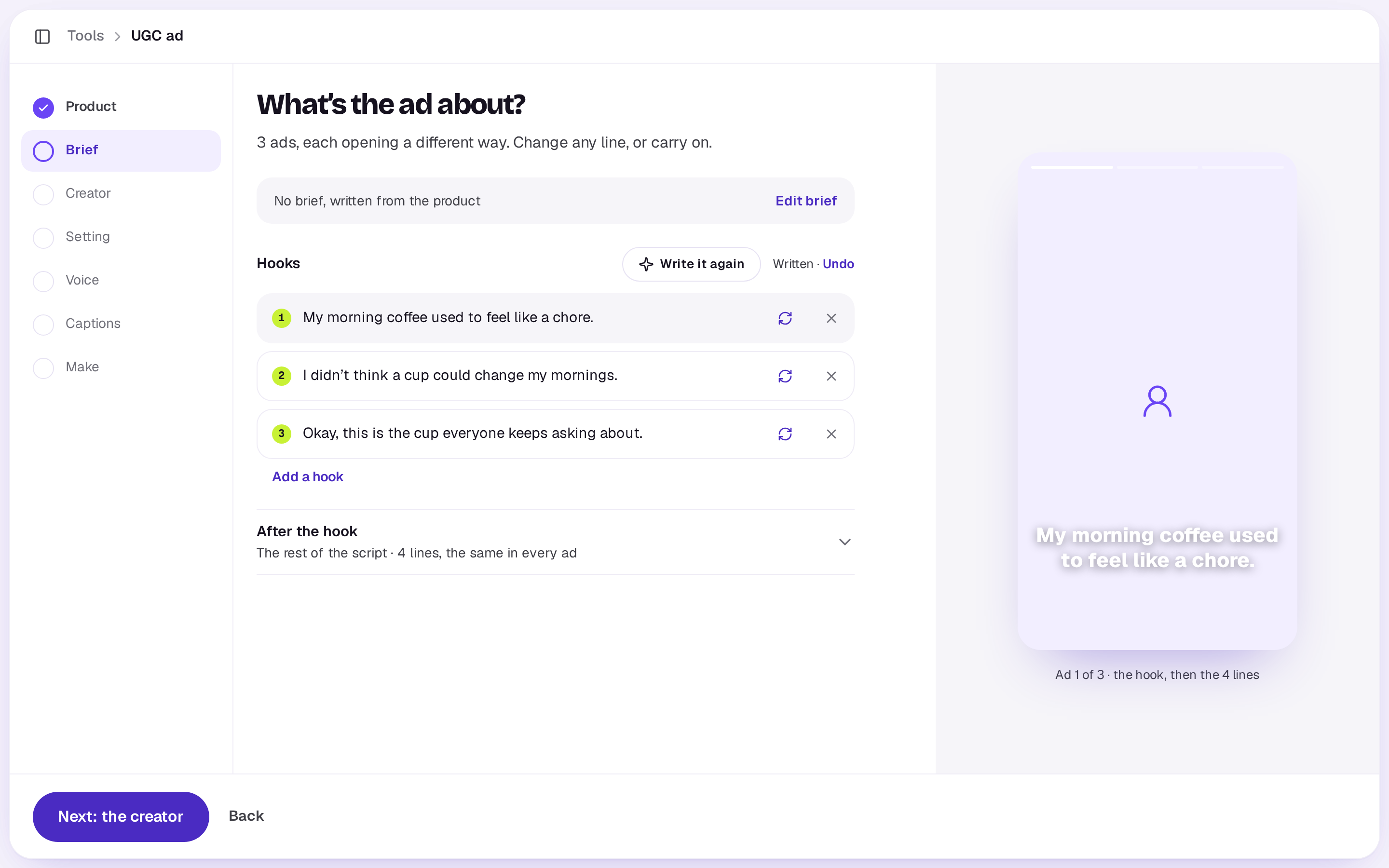
Once it’s written, the brief folds to one line with Edit brief, and the hooks show, one ad each:
- Hooks: type over any of them, press the arrows beside one to write just that one again, remove one, or Add a hook (up to 5).
- After the hook: the lines said in every ad after its hook, up to 12, folded into one row; open it to change them. Beside each line, describe a product shot to cut to while it’s said, or leave it On camera. Up to 5 lines can have a shot.
Write it again writes the whole script afresh, and Undo beside it puts back what was there, until you type again. Edit brief opens the brief again: Write it again · free rewrites the script from it, and Keep the script goes back without changing anything. Writing is free. Going back to change the product or the creator never rewrites the script.
Under Options, with brands on Pro or Team, pick one under Brand, your default first, and anything written for you is in its voice; No brand writes it plainly. To take after an ad you saved in Inspiration, also under Options, choose Write it like an ad you saved. The hooks borrow what works in it, in your own words. It never copies the ad. Once an ad is picked, switches for its Format, Hook, Angle and Look appear, all on to begin with, with Anything else to change? for your own words. What you switch off is made new. To start from a link instead, see Remake an ad you like.
3. Creator
Pick one of your character elements, Cast one for me, or one of the Shotz creators: everyday people filmed on their phone. Picking one moves you on. The script is written for “the creator”, so any of them can say it.
With a Shotz creator, the next step asks Where does {name} film? and shows the places they appear (in the car, the kitchen, the gym and so on); picking one moves you on. The creator’s voice is picked for you, and you can change it later. The first time you use a creator, Shotz saves them to your workspace as a character element, with each place as a look, so you can tag them elsewhere too.
Otherwise the next step asks for Where they film it and, with Cast one for me, Who’s talking. Type them, press the sparkle to have them written, or leave them empty for Shotz to pick.
4. Voice and captions
Whose voice? lists every voice; press one to hear it (a character with a voice of its own starts with it). Under Options, pick the talking avatar model. Then How should the captions look? shows each caption style on your creator, or No captions. Under Options are the Shape (9:16, 4:5 or 1:1), Music under it, and the “AI-generated” label, which most ad platforms ask for.
5. Make
The last screen has The edit’s name (the sparkle names it for you), then lists your choices, each with Change. If part of the script is still empty, it says so, with Write them · free: empty hooks and lines are otherwise left out. Until there’s at least one hook and one line, the button is Write the script · free instead of Make. Then What it costs, part by part: the creator’s frame, the voiceovers, the talking hooks and body (priced by the second), the product shots and the music. Each part is charged as it’s made, and anything that doesn’t work gives its credits back. The talking parts are priced again on the voice’s real length, but never above what the screen quoted, so the total can come in a little under and never over. The music is made as long as your longest ad plus two seconds, between 15 seconds and a minute, and the quote counts the same length. A Shotz creator in 9:16 brings their own frame, so there’s no charge for The creator’s frame; in 4:5 or 1:1 one is made for the shape.
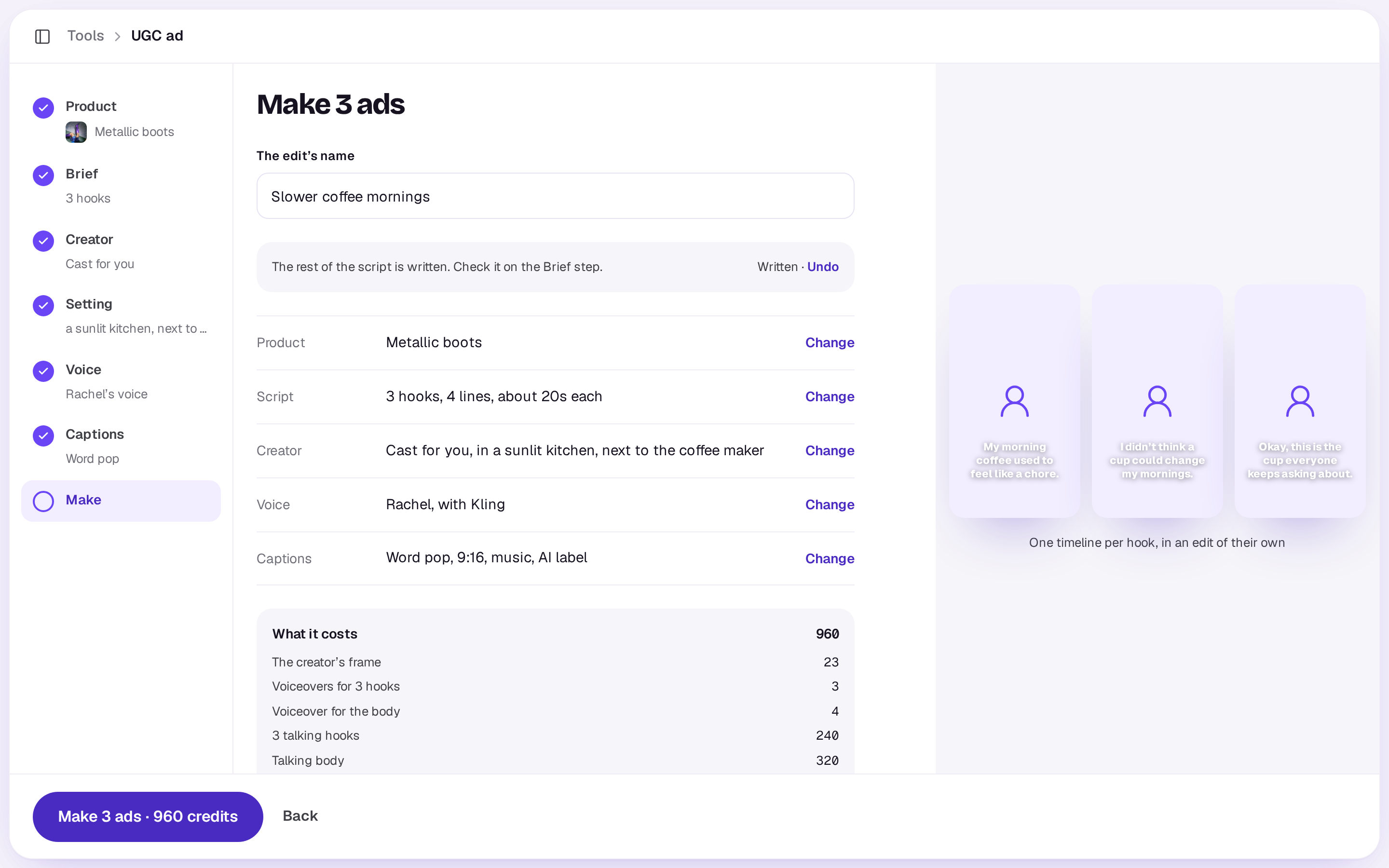
Making the ads takes ten minutes or so. You can close the tool; you’ll get a notification when they’re ready. A workspace can have 3 UGC ad runs going at once. A run keeps spending as whoever started it, so if they’re removed from the workspace or made someone who can only comment, it stops and says so, and credits for anything that hadn’t started come back.
What you get
An edit with one timeline per hook: the hook, then the body, the product shots over the lines they go with, captions timed to the voice, the music, and the label if you asked for it. Open any timeline to change a line, a shot or a caption like any other.
A real person in Melbourne will write back, usually within one business day.