Keep a character the same across shots
Make an element from your photos, then tag it with @ in any prompt.
An element is a character, product, place or thing you want to look the same every time: a person, a pair of shoes, a kitchen. You make it once from photos, then tag it in any prompt.
Make one
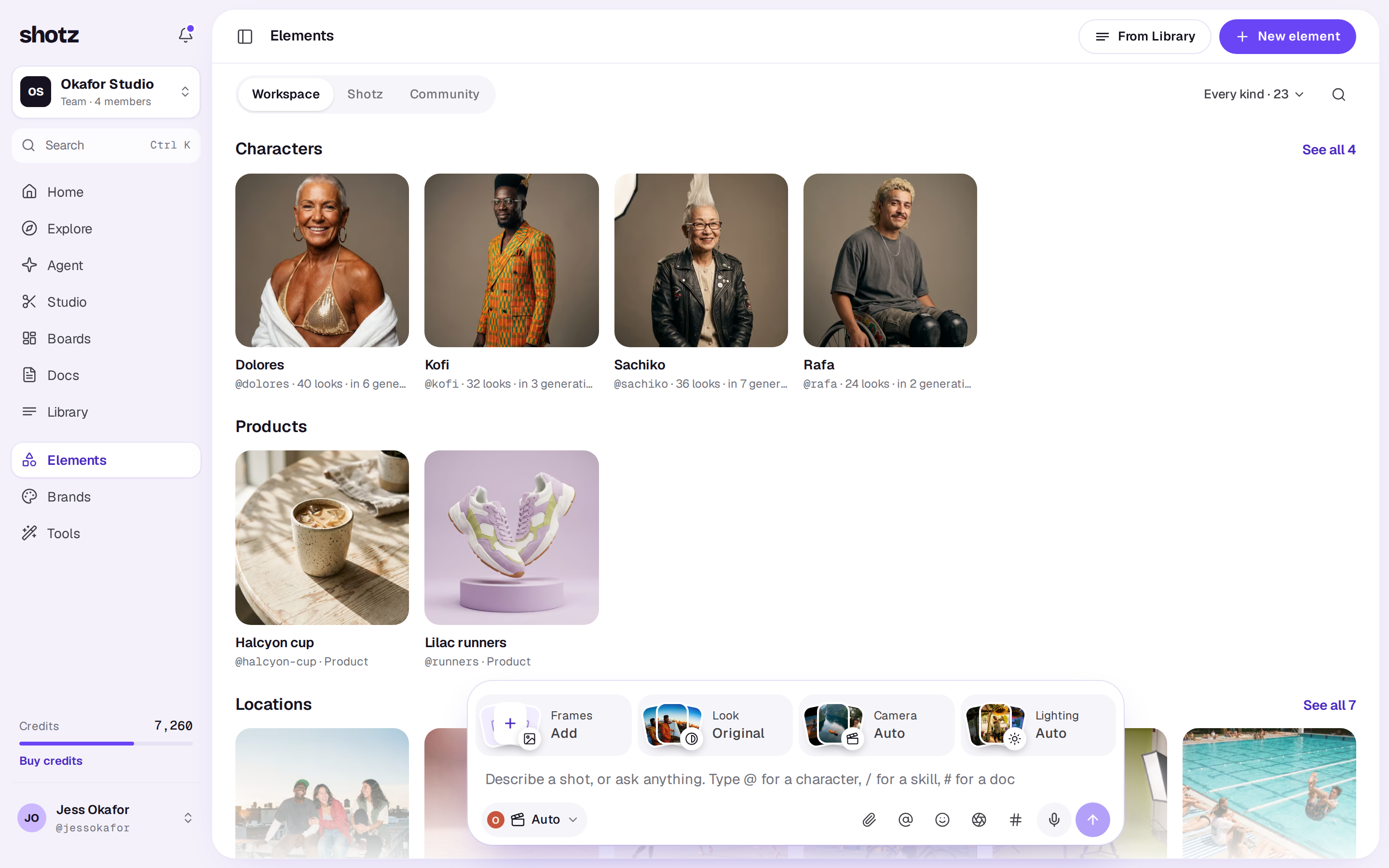
- Open Elements in the sidebar and choose New element at the top right. On a phone, tap the violet + at the top right. While your workspace has none, Workspace shows three ways to start instead: From your photos (this one), Save one from Shotz and Save one from the community.
- Photos: pick photos from your Library: clear, well lit, from a few angles. Three to six works best. To add new ones, drop them on the box at the top (or choose it to pick files), or drop them anywhere on the page. They go into your Library and are picked straight away, numbered with the rest. Choose Next: name it.
- Name it: type its name and choose what it is (Character, Location, Prop and so on). If you like, choose Describe what should stay the same and say it, for example “late 20s, curly red hair, freckles”. Choose Next: look sheet.
- Look sheet: choose 8 looks to have Shotz generate eight more pictures of it, from close-up to full body, which give models more angles to match. It costs credits and takes a few minutes. You need enough credits for the whole sheet to start it, and each look is then charged as it’s made; a look that can’t be made is marked as failed and its credits come back. Just the photos is free and ready at once; you can make a look sheet later from the element’s Details.
- Choose Make and its name. If photos are still uploading, the button says it’s waiting for them and makes the element once they’re in. The element then opens, and its looks appear as they’re made.
Making an element from the Library (a file’s Make an element, or the selection bar’s) starts on Name it with those files picked. Everyone in the workspace can tag your elements.
The photos stay in your Library. Deleting an element doesn’t delete them.
Picking one of the Shotz creators in the UGC ad tool also saves them to your workspace as a character element, with each place they film as a look.
A photo you bring to a tool can become an element too. In the UGC ad, Ad creator, Product photoshoot and Product video tools, a photo you upload goes into your Library, and you can tick Save it to Your products to use again (in Recast, Save them to Your characters to use again). When you go on, a ticked photo is made into an element named after its file, and you can open it from the message that follows. Left unticked, the photo is used just this once.
The Elements page has three tabs, by where an element comes from: Workspace for your workspace’s own, Shotz for the public library, and Community for ones other people shared.
Use one
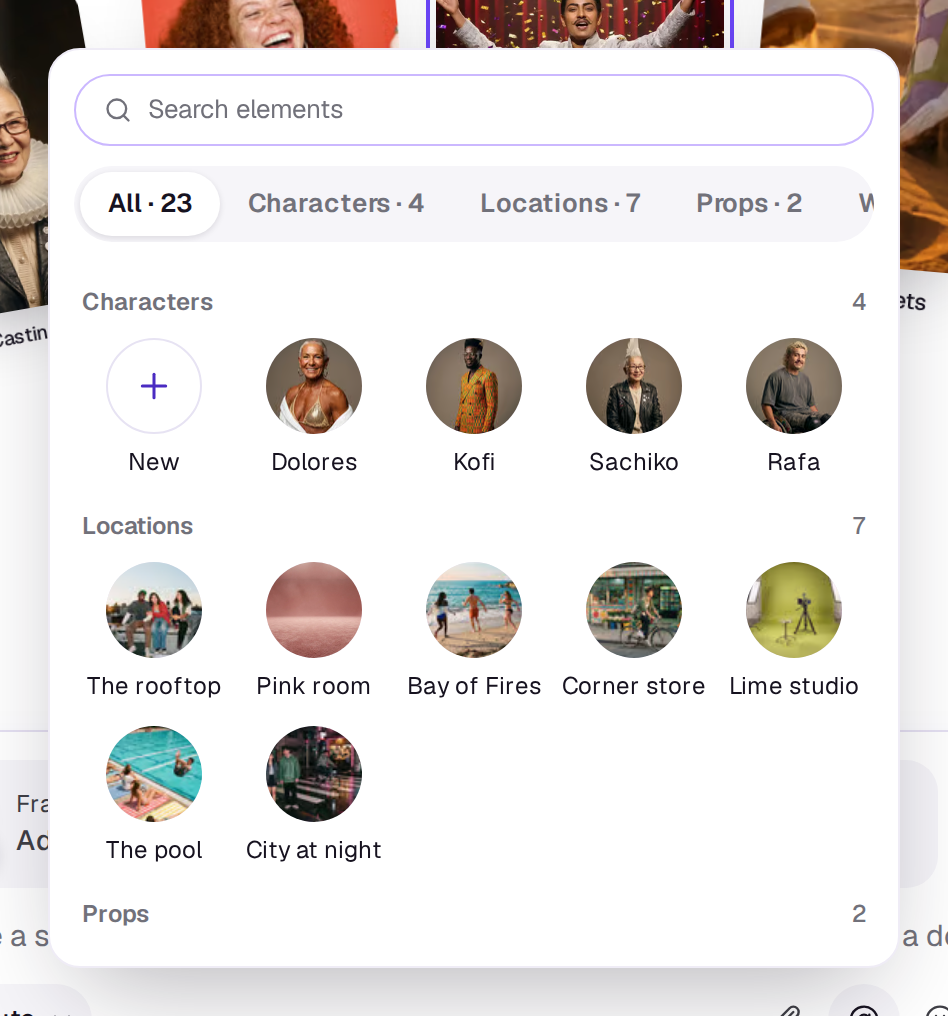
Type @ in the card and pick the element from the list, or choose the @ icon in the row under your words and tap it in the list. The list has a Search elements box and tabs with counts: All, then each kind your workspace has. Under All the elements are grouped by kind. New comes first and opens the Elements page to make one. A tap puts the element in your words where your cursor was, or at the start if you hadn't clicked in them yet. You can tag more than one, for example a character holding your product; each shows highlighted in your words, and stays highlighted in your message once you send it to the Agent. To take one back out of your words, choose the × at the end of its highlighted name, or press Backspace just after it. An open element also has Use in Create, which closes it and opens the card with it tagged: at the foot of the page on a computer, the drawer on a phone. In the card, @ lists elements only; teammates are mentioned in comments, not prompts. An element can’t take the tag @agent or one starting @person-, which comments use for the Agent and for people, so an element named Agent is tagged @agent-element.
The list only tags elements. To delete one, open it on the Elements page (see Open an element).
When you generate, the element’s photos go to the model as references along with your prompt, and the prompt names the element by the image it’s in. An element with several photos goes as one reference sheet of them, so a few elements fit in one shot; a sheet holds up to 12 photos. You can tag up to 8 elements in one run. A model only takes so many images, and the ones you named last in your words are the ones it leaves out. Shotz says exactly which before you generate, and offers a model that uses everything. To put a character in a video with certainty, make an image with them tagged, then use that image as the start frame. To add images that aren’t an element, use References in the Frames tile. See Start and end frames.
Open an element
Choose an element on the Elements page to open it over the page, the way the Library opens a file. Its pictures are on the left, with a strip under them to pick one. A small tag on the picture’s bottom-left corner says what it is: Reference photo, or the look’s name and kind. The left and right arrow keys step to the next element, and Escape closes it. On a phone it opens full screen, with Use in Create at the foot and the same tag just above the element’s name; on a public element the bookmark sits beside it to save it. Delete (or Remove) is under ⋯. Swipe up for the rest, in the same tabs as on a computer.
On a computer, Use in Create is in a bar under the pictures, and the rest is in tabs beside them: About, Details, Settings, Share, Made with and Comments. A tab with nothing to show is left out.
- About is what you wrote under What should stay the same.
- Details has how many photos and looks it has, and its Tags. Owners and editors can add one with Tag and remove one with its ×; search finds the element by them. If it has no look sheet yet, Make a look sheet at the foot of the tab starts one, with its credits on the button.
- Reference photos are the photos it was made from. Looks come from its look sheet.
- The + at the end of the strip opens a box to describe one more look; choose Add look to add it, or choose Make another like this under a look. On a phone there is no strip, so the box is at the top of Details. A look is a picture added to the element’s references, so every model sees it when the element is tagged. It isn’t a shot in your Library.
- Settings (characters) has the Voice: voiceovers that tag the character speak in this voice, and UGC ads use it. Play it to hear it, and choose Change to hear and pick another.
- Share shows on elements you made yourself, with Share with the community. Choose Share, or Open once it’s shared. More under The community below.
- Made with shows the latest things generated with it, two across; choose one to see it big.
- In Comments, anyone in the workspace can leave a comment on it, or reply to one.
- Delete is under ⋯. It removes the element.
Public elements
Choose Shotz on the Elements page to see the public library of characters, products and places. Open one and choose the bookmark beside Use in Create, or the bookmark on its tile, to copy it into your workspace for free: its photos stay with the element and don’t show up in your Library, and anyone in the workspace can tag it. The copies count toward your storage, so if the Library is full it says so first. See Library storage.
To take one off your list, choose the filled bookmark on its tile, or Remove under ⋯ when it's open, then confirm. It stays in Shotz so you can save it again.
The community
The Community tab on the Elements page has elements other people shared. Choose Save on a tile, or the bookmark beside Use in Create when it’s open, to make your own copy, photos and all. It’s free, and you can tag it in any prompt. Use in Create saves it, closes it and opens the card with it tagged. To tell someone about a problem, open it, choose ⋯ and then Report.
While nothing is shared yet and your workspace has elements, the tab shows empty tiles, the first one reading Share an element. Choose it to go back to your own elements.
To share one of yours:
- Open the element and its Share tab, then choose Share.
- Tick that the photos are yours to share, and, for a character, that the person in them agreed.
- Choose Share.
Its reference photos and looks go with it, up to 12 photos. An AI checks it first, usually within a minute, and you get a notification with the answer. Only the person who made an element can share it, not a copy saved from Shotz or from the community. You can share up to 20 elements a day. If an owner has turned off community sharing for the workspace, you can’t.
Your own shares show in the tab in every state: being checked, only you can see it, or taken down. Open one to read why. Open one and choose Stop sharing in the bar under its photos to remove it. People who saved it keep their copy. A share the check took down can’t be removed for 30 days, as with posts. See How posts are checked for what the check looks for.
A real person in Melbourne will write back, usually within one business day.