Make static ads with the Ad creator
Static ads for feeds and stories, in your brand, in a few versions to test.
The Ad creator makes static ads: a picture of your product with a headline, a button and the rest laid out on it, ready for Facebook, Instagram and TikTok feeds and stories. You write a few versions to test, or have Shotz write any of them; then Shotz makes a picture of your product for each, and lays them out in your brand’s colours and type. Every ad is a design in Studio, so any word, colour or picture can change before you export it. Open Tools → Ad creator.
You can also ask the Agent to set it up. It opens this tool on the first step with your product, the brief, the kind of ad and how many already filled in. Check them and go on; nothing is written or spent until you do.
1. Product
Drop a photo of the product on the box at the top (or anywhere on the page), choose choose one in it to pick a file, or paste one with ⌘V; on a phone, tap Add a photo to take one or pick one from your phone. Or pick one you already have: Your products are your product elements, with the one you used last already picked, and Library is everything else, with a search once there are more than a dozen. A photo you upload goes into your Library and is picked; it stays in a row of tiles under the box, newest first, so you can pick another of them later. Tick Save it to Your products to use again to make it a product element when you go on, so it’s there next time; leave it unticked to use the photo just this once. To make a product from several photos, choose New product.
2. Kind of ad
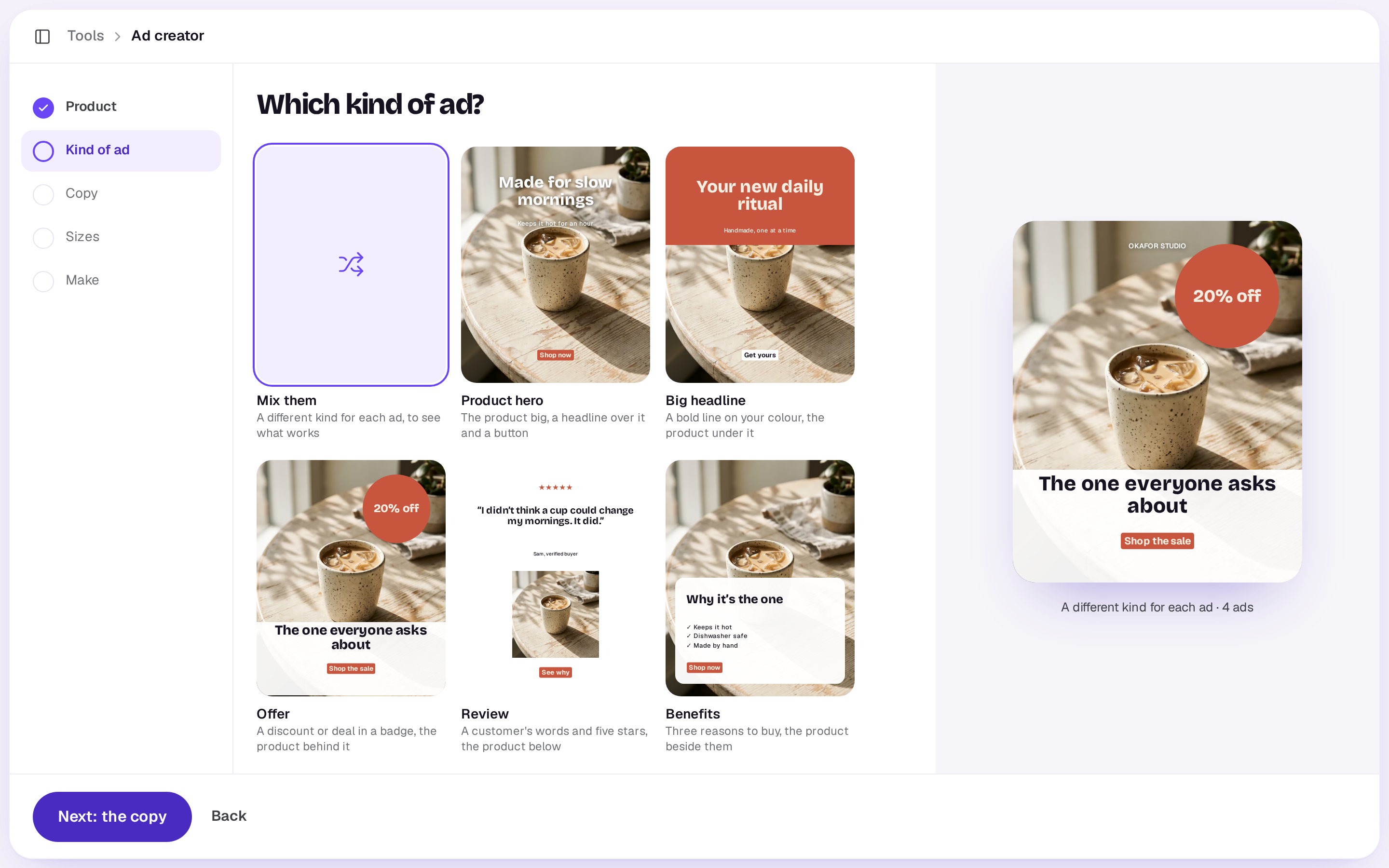
Pick the kind of ad:
- Product hero: the product big, a headline over it and a button.
- Big headline: a bold line on your colour, the product under it.
- Offer: a discount or deal in a badge, the product behind it.
- Review: a customer’s words and five stars, the product below.
- Benefits: three reasons to buy, the product beside them.
Or choose Mix them for a different kind in each ad. Under Options, pick How many ads (2, 4 or 6). Then choose Next: the copy.
3. Copy
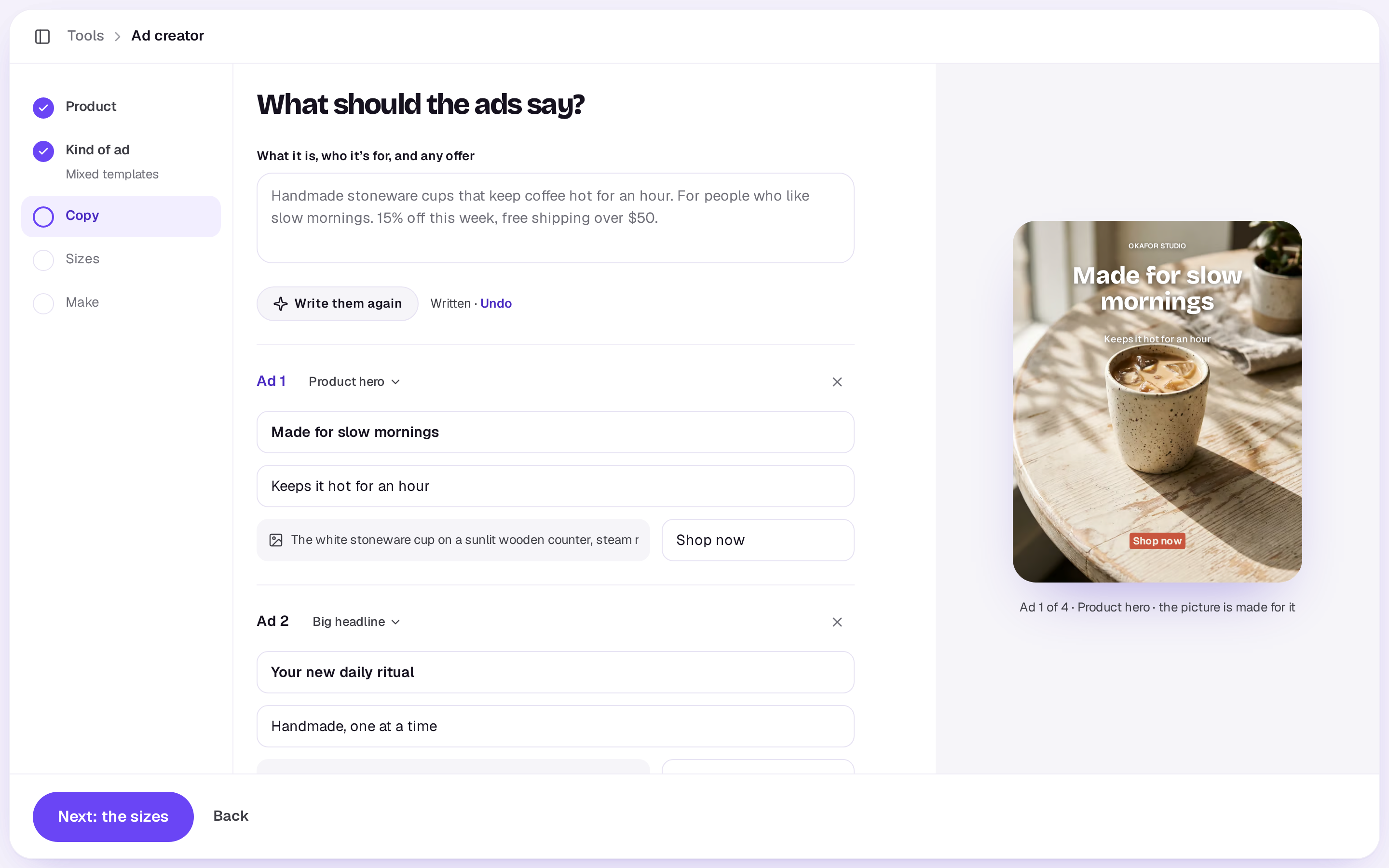
At the top, fill in What it is, who it’s for, and any offer: what you’re selling, who it’s for, and any deal the ads should mention. Under it, each ad starts empty, in the kind you picked: its template, headline, the line under it, the offer, the review and who said it, the three reasons, the button, and what the picture shows. Type them, remove an ad with ×, or Add an ad (up to 6).
Write it for me fills every empty ad from the brief, and the sparkle by an ad with no words writes just that one. An ad you’ve started keeps your words and gets only what its kind still needs. Once every ad has words, the button says Write them again. After either, Undo beside it puts back what was there, until you type again. Writing is free. The preview shows the ad you’re working on. With nothing to go on yet (a brief of a few words and no ad started), it says so under the brief: Say a little more about what you’re selling and who it’s for, or write an ad first. Next: the sizes needs at least one ad with words; until then it says Write at least one ad first, or choose Write it for me.
Under Options, with brands on Pro or Team, pick one under Brand, your default first: anything written for you is in its voice, and the ads are laid out in its colours and type. No brand keeps them plain. To take after an ad you saved in Inspiration, also under Options, choose Make it like something you saved (it only shows once you've saved something). Shotz borrows what works in it (the kind of hook, the layout, the feel of the picture) for your product, in your own words. It never copies the ad. Once an ad is picked, switches appear for its Format, Hook, Angle and Look, all on to begin with, with Anything else to change? for your own words. What you switch off is made new. With Mix them chosen as the kind, keeping the Format puts every ad written for you in the one template closest to the reference. The pictures follow its look closely only while Look is on. To start from a link instead, see Remake an ad you like.
4. Sizes
Turn on the sizes you need: Square (1:1), Feed (4:5) and Story (9:16). Each ad is made in each size, as its own design, with the words kept clear of a story’s top and foot. Under Options, Pictures made on picks the model that makes the pictures and, with a brand, Brand name on each ad puts its name small at the top of each.
5. Make
The last screen has The set’s name (the sparkle names it for you), then lists your choices, each with Change. An ad with no words is left out, and the screen says so with Write them · free; with none written at all, the button is Write the ads · free instead of Make. Then what it costs: one picture for each ad in each size. Writing the copy and laying out the designs are free. Each picture is charged as it’s made, and anything that doesn’t work gives its credits back.
Making them takes a minute or two. You can close the tool; you’ll get a notification when they’re ready. A workspace can have 3 sets of ads being made at once. A run keeps spending as whoever started it, so if they’re removed from the workspace or made someone who can only comment, it stops and says so, and credits for anything that hadn’t started come back.
What you get
A design for each ad in each size, named for the set, the template and the size, in Studio. Open one to change a word, move the button or swap the picture, use the image tools on its picture, then export it as a PNG or JPEG. With a brand on Pro or Team, the ads use its colours and type.
A real person in Melbourne will write back, usually within one business day.