Your community profile
Your page at shotz.co/@handle: what’s on it, your saved posts and how to make it yours.
Everyone on Shotz has a page at shotz.co/@ and their handle, laid out like a portfolio. Anyone can open it, signed in or not.
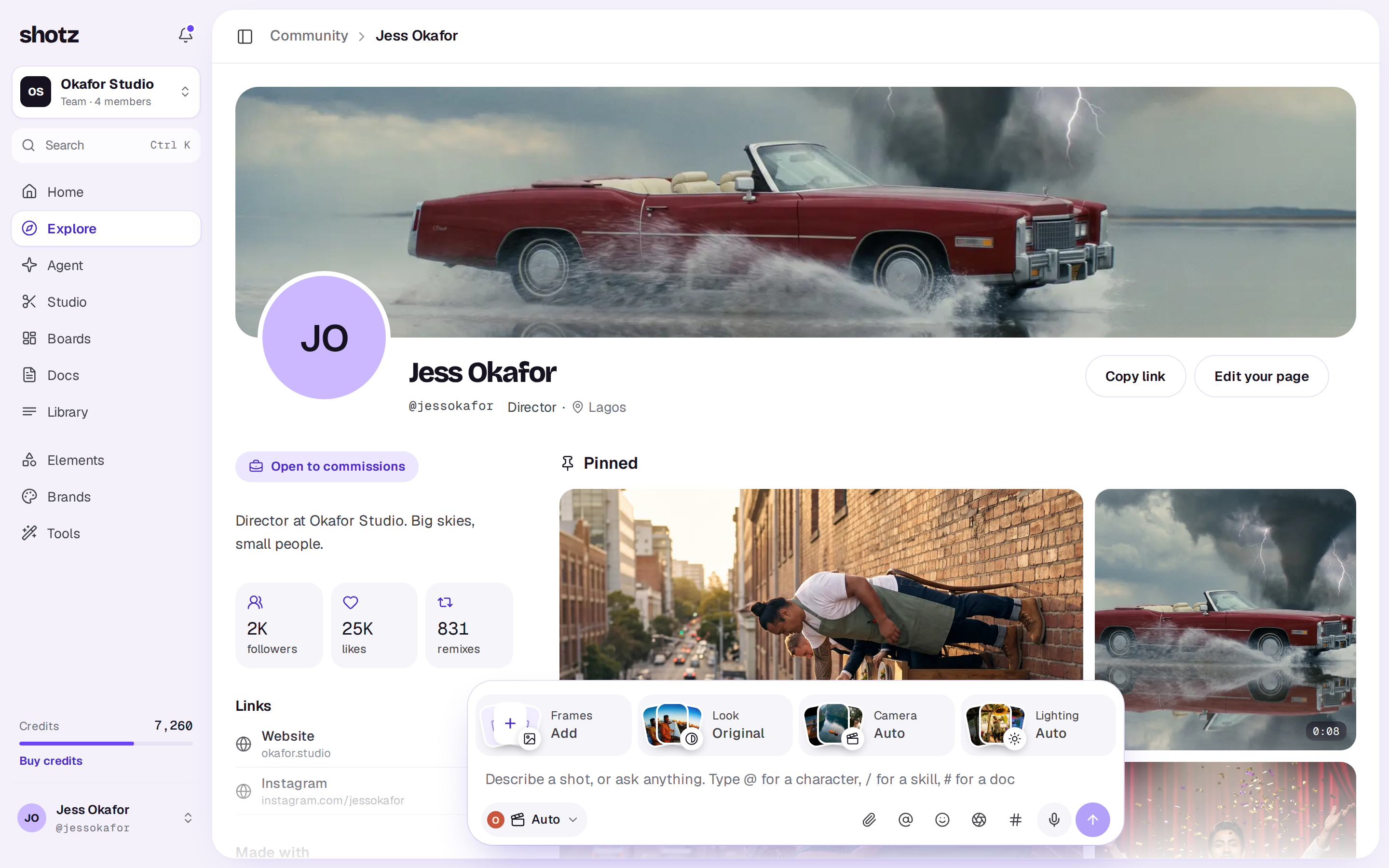
What’s on it
- A cover across the top, a still from one of your posts, then your photo, name, handle, what you do and where.
- Beside your work: an Open to commissions badge if you’ve turned it on, your bio, how many followers, likes and remixes you have, your links, the models you use most, and, on other people’s pages, which of the people you follow also follow them.
- Pinned posts, up to three, with the first one biggest.
- Your series, if you’ve made any.
- Your work, under All work, Videos, Images and Remixes, newest first or Most liked. Until you've shared something, your own page shows a Share a take tile that opens Create.
Find yours
On a desktop, choose Your profile at the top right of Community. On a computer you can also click your name at the bottom of the sidebar and choose Your page. On a phone, tap your picture at the top left and choose the line with your handle, your profile. Settings → Profile and sign-in links to it too.
Work and Saved
On your own page you also see Saved, the posts you saved, and only you see it. All work includes posts still being checked, kept out of the feed or taken down, each marked with where it stands.
Other people see your posts that are up, including ones kept out of the feed. See How posts are checked.
Make it yours
Choose Edit your page on your page. You see your page as others will beside the settings, and your changes show as you make them. Choose Save changes to keep them.
- Cover: pick one of your posts, or No cover.
- About you: What you do (up to 60 characters), Where you are (40) and Bio (160). Links can’t go in these.
- Links: up to five, each with a name and an address, with Add a link. They show once you have a post anyone can see.
- Pinned: up to three of your posts. Deleting a pinned post takes it off your pins.
- On your page: switch Open to commissions, Series, Made with and Remixes on or off, and pick a Grid of Square or Original shape tiles.
Covers, pins and series only use your own posts. Name, photo and handle are in Settings → Profile and sign-in. See Your name, photo and handle.
Copy link on your page copies its address to send to people.
A real person in Melbourne will write back, usually within one business day.