Notifications
Where notifications show up, what you’re told about, and marking them read.
Shotz tells you when something happens that you’d want to know about, even when you’re on another page.
Where to find them
- On a computer, click the bell at the top of the sidebar. A purple dot on it means something’s unread.
- On a phone, tap the bell at the top right of Home or Studio. A purple dot on it means something’s unread. It opens a page of its own; the back button at the top left returns to Home.
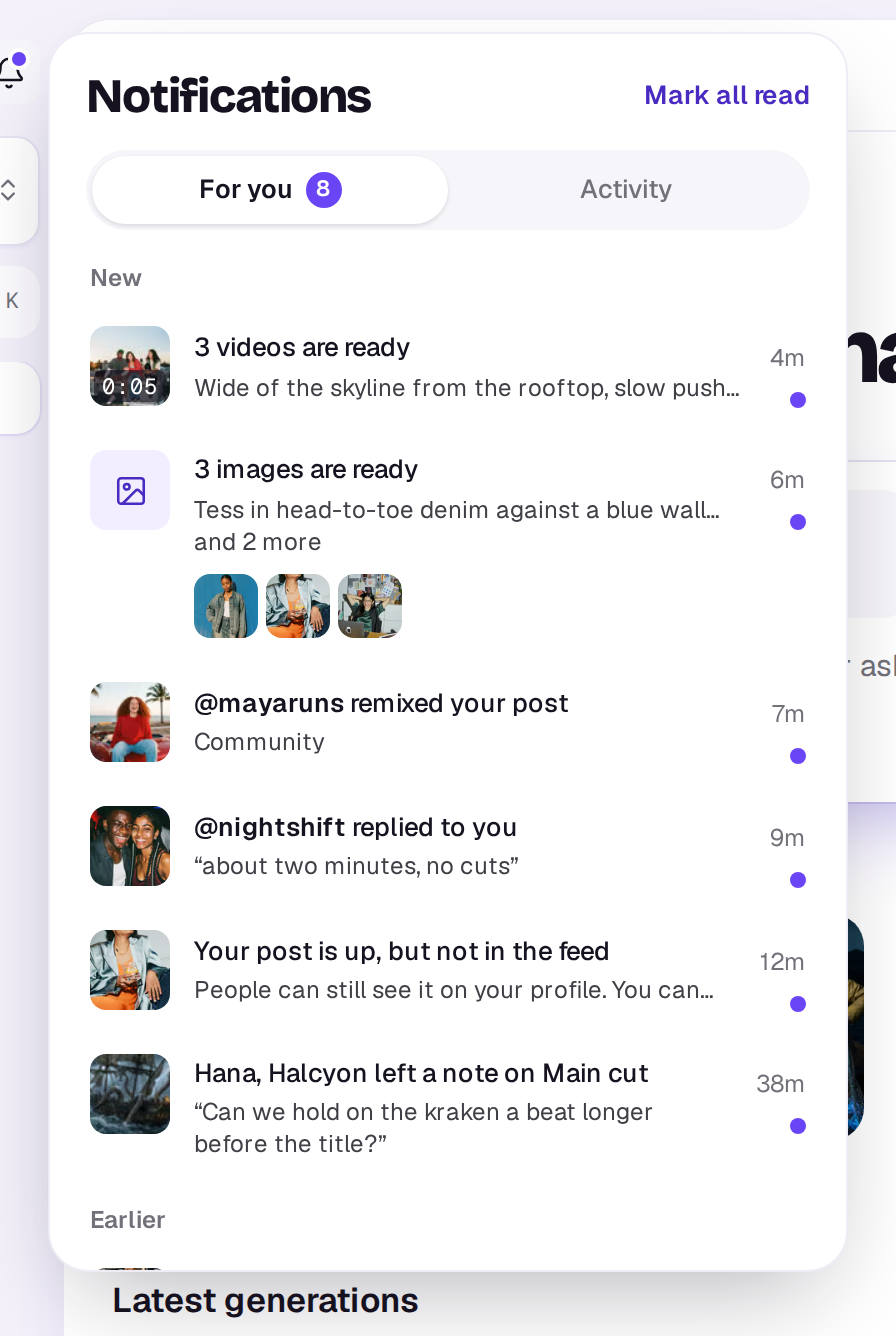
Two tabs sit at the top. For you, where it opens, is what needs you, with how many are unread beside its name. Activity is everything the workspace has been doing, your own work too, grouped by day; it never counts as unread. See Find your way around.
Under For you, unread ones are listed under New and the rest under Earlier. Marking something read while the list is open only clears its dot; it stays where it is until you open the list again, so nothing moves under you. Each has the time at the top right, with a purple dot under it while it’s unread. A finished take says what it made, such as Your image is ready or 3 videos are ready, with your prompt under it, and a video shows its length on the picture.
When several takes of the same kind finish within 15 minutes of each other for the same place, they come as one notification, like 6 images are ready, with a small picture of each. They stay together whether or not you’ve read some of them.
Click one to go to what it’s about; that marks it read. A take that made one file opens that file in the Library. A tool’s one result, such as a track from Music, opens on the tool’s page where it’s ready to play, download or edit. A tool that made several files, or one that didn’t work, takes you back to the tool. Mark all read clears the rest. When you have unread notifications, the browser tab’s title shows how many, so a tab in the background tells you something happened.
Only what needs you also pops up while you’re in the app, at the top centre on a computer and above the tab bar on a phone: takes that are ready or didn’t work, notes on your edits, replies to your comments, being mentioned in a comment, being added to an edit or workspace, and billing. A run of takes arriving together is one pop-up that counts up, such as 4 images are ready, with small pictures of them. Likes, follows, remixes, comments on your posts, comments on files, elements and docs, and people joining wait in the bell.
Takes don’t pop up on Home, Create or Remove background, and a note doesn’t pop up while the Comments tool is open on the edit it’s about, since you can already see it there.
Notifications are kept for 90 days.
What you’re told about
- Takes: when your takes are ready, or when one didn’t work (its credits are back). A batch tells you once, when every file has been through its steps, such as All 12 are ready.
- Notes on your edits: when someone leaves a comment or a reply on an edit you’re in. Choosing it opens the comment in the editor.
- Mentions: when someone types @ and your name in a comment on an edit, a design, a doc, a file, an element or a board, such as Ama mentioned you on Main cut. Choosing it opens the comment. It's emailed a couple of minutes later if you haven't seen it, unless you've turned comment emails off. You only get the mention, not a second notification for the same comment.
- The Agent’s answers: when you ask the Agent with @agent in a comment and it has replied, such as The Agent answered you on Main cut. Choosing it opens the conversation. See The Agent.
- Comments on files, elements and docs: when someone leaves a comment on a file you added, an element you made or a doc you made, or writes in a thread you’re in. A file’s or an element’s opens it on its Comments tab. A doc’s opens the doc at that conversation.
- People: when someone adds you to a workspace or an edit, when someone joins a workspace you own, and when someone accepts your invite to an edit.
- Billing, for owners: when a payment didn’t go through, the workspace is running low on credits, or automatic top-ups have paused for the month.
- Credits you earn: when a post or a remix earns you credits, such as Your post earned you 5 credits, and reminders that your free images are waiting or that earned credits expire soon. Choosing one opens the post, or Create. See How credits work.
- The community: likes, follows and remixes of your posts, comments and replies, and where your post was put after its check.
Emails
Some notifications also come by email, such as takes that finished while you were away and notes on your edits. Choose which ones in Choose which emails you get.
On your phone
In the Shotz app for iPhone and Android, notifications can also come as push notifications, so you hear about them with the app closed. The first time a take is ready while you’re in the app, Shotz asks whether you’d like that; tap Turn on, then allow notifications when your phone asks. You can also turn them on later in Settings → Notifications → Push on this phone.
Pushed are takes that are ready or didn’t work, notes on your edits, replies to your comments, being mentioned in a comment, comments on your files and elements, being added to a workspace or edit, and billing notices. Takes that finish together come as one push, such as 3 videos are ready, and something you’ve already read in the app isn’t pushed. Tapping a push opens what it’s about.
Under Push on this phone you can choose which of these are pushed: Takes that are ready, Comments and replies, and Being added to a workspace or project. These choices follow your account, so every phone you’ve turned push on for uses them. Billing notices always come while push is on.
Turning Push on this phone off, or signing out, stops pushes to that phone. If you turned notifications off for Shotz in your phone’s own settings, turn them on there first.
If someone else’s account was using the phone and didn’t sign out, turning push on can say This phone still gets another account’s notifications. Sign out of that account on it first, or try again tomorrow. Once they sign out, or have been away from the phone for a day, it works.
A real person in Melbourne will write back, usually within one business day.